Welcome to Ticked Off
We are excited to have you coming on board. Country Road Group are now using the Ticked Off software solution to manage the Repairs and Maintenance functions across our portfolio of properties and brands.
Below you will find some introductory information about Ticked Off. You can also find more information at www.tickedoff.app
To get started, please complete the contractor registration form by clicking below:
Work Orders
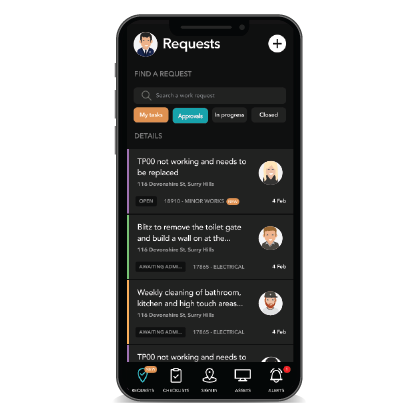
From the 'go live' date, you will receive email (and push notifications via the mobile app) as work requests are issued to your business. These will be sent to the Administrator user set up in Ticked Off for your business.
The information within the work request will include all relevant job and site information:
- Urgency of the job request and expected timeframe the job is to be completed within
- Site location and address details
- Photos of the job taken by our team on-site
- A brief description of the job as well as notes from our Support Team
Please note, all ad-hoc and programmed job requests will be managed in Ticked Off.
Scheduling
When accepting a job request, you will need to nominate the day and time you or one of your team will be attending site - this action can be completed on either the mobile App or on the web platform. You will also have the option to assign a member of your team to be responsible for that job.
If for any reason you are unable to attend to a job at the time you had scheduled, please reschedule via the Ticked Off web platform or app. Keep in mind that all actions taken in Ticked Off will automatically generate an email notification to those people who want to stay informed.
You can always check what upcoming job commitments you have made by using the Calendar menu item on the web-platform.
Sign in / Sign out
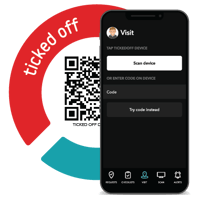
Prior to commencing works at any site, you or the team member attending will need to “sign in” to the location via the Ticked Off QR sign-in token.
Signing in will prompt you to acknowledge any known risks, including asbestos. Depending on the type of works, the person attending site may be required to complete a risk assessment prior to commencing any works.
Once signed in, your team member will be able to access the work request details, and add photos and notes - all of which will be visible to you and the client. We strongly encourage adding photos to the request whilst still on site!
If your company uses software to manage scheduling of your team and invoicing etc, please contact us about connecting to Ticked Off via API. Email the team at support@tickedoff.app
Please note - sign-in and sign-out is mandatory. Failure to do so may impact the prompt processing of invoices.
For more information on the sign in process, please click here

Supplier Review & Invoicing
Once your team have attended and completed the work, you will be able to review all the information you provided, confirm your rates and costs, and submit any relevant reports or other documentation, including your invoice.
Ticked Off also have an automated invoice reader than can further streamline this final step for you, allowing you to manage this step by simply sending an email!
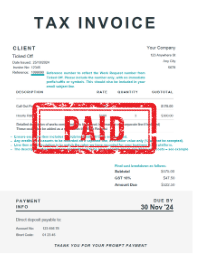
To ensure your invoice contains the required data, view an example invoice here
By completing the above 3 steps correctly within the expected time frame, you will be eligible for Fast Payment! Guaranteed within 24 hours of Admin approval.
User Accounts
There are 2 types of User Accounts available for Contractors:
Supplier Admin - view and manage all jobs, users and permissions across your Supplier Profile.
Supplier User - view and update only the jobs that have been assigned to you by your Supplier Admin.
Admins will have the ability of creating your own accounts for your own users where applicable.
Costs
There are no costs to your company to use Ticked Off - all costs are paid for by the client.
However, there are some features that exist in Ticked Off that may be helpful to you as a Contractor and we suggest you contact the team at Ticked Off on 1800 842 533 or via email on hello@tickedoff.app
We recommended downloading the Ticked Off App for ease of use on the go - it works on every smart mobile device. Select a store below:
![]()
Help is always available
Ticked Off will provide initial online training.
For ongoing support please continue to contact your Maintenance Coordinator .